Every month in order, with gaps shown
Statements are put in date order from their names or their first page. A missing month shows up before anyone reviewing your application notices it.
Put months of statements in date order, remove the pages nobody needs, and save one file that fits the upload limit.
Your files stay on this device.
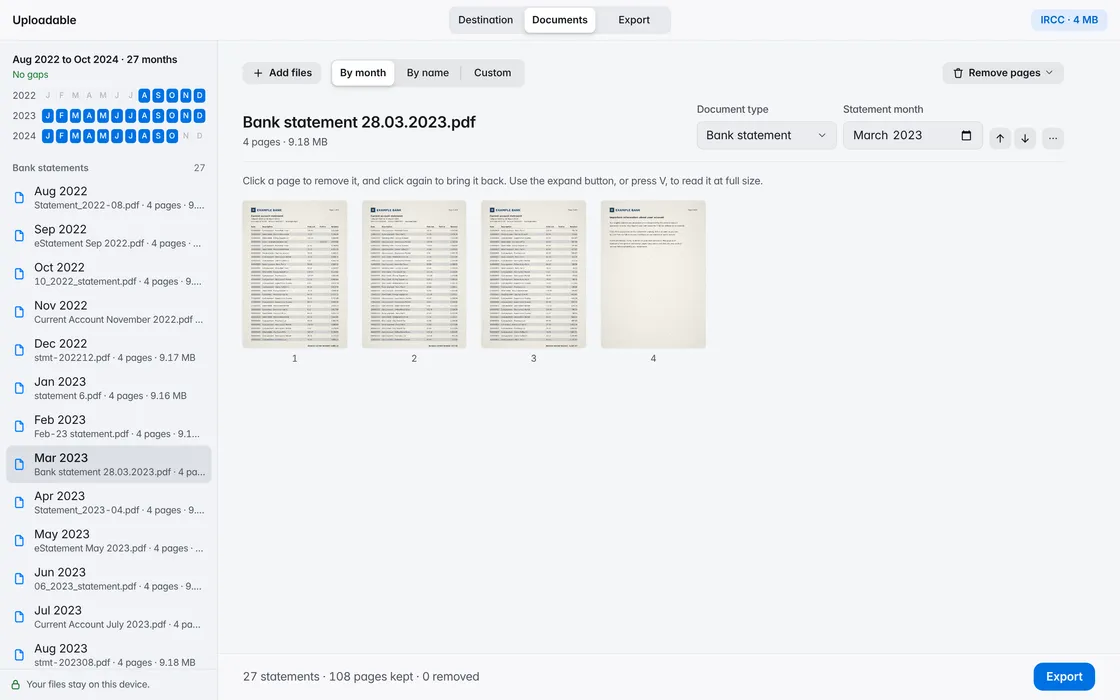
Statements are put in date order from their names or their first page. A missing month shows up before anyone reviewing your application notices it.
Jan 2024 to Dec 2024 · 12 months
Missing Jun 2024
The combined file is named from the months it covers, so whoever opens it knows what’s inside before they start reading.
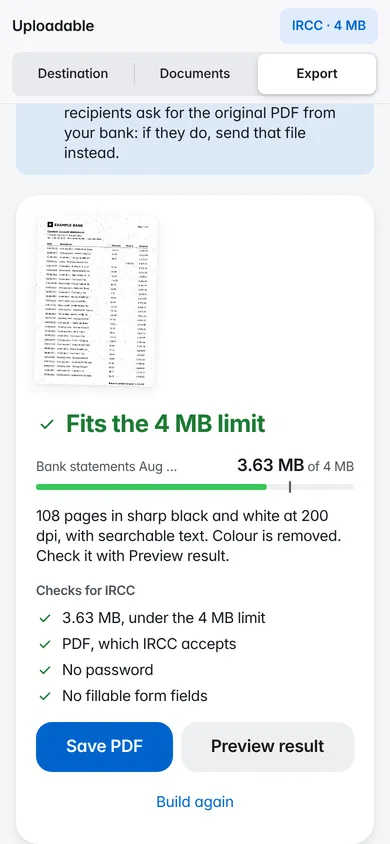
If your documents already fit, they’re kept exactly as they are. If not, images are shrunk first, then pages become crisp black and white at the sharpest resolution that fits. The text stays searchable.
Fits the 4 MB limit
Uploadable opens, sorts and compresses your documents inside this browser tab. There’s no account, and no server ever sees your files. It remembers only your light or dark choice and the last destination you picked.
Date order, from the month in each file name or on its first page. You can set a month yourself, sort by name, or move files up and down.
Yes. Remove the last page of every statement at once, a page number from each, or every page that mentions a phrase such as “important information”.
No. Uploadable works inside your browser tab. Your documents are read and saved on your device and are never sent to a server. It remembers only your light or dark choice and the last destination you picked.
No. Uploadable never edits text or amounts. It can only put files in order, remove whole pages and make files smaller.
Yes. Enter the password your bank gave you. It’s used on this device only and isn’t stored. The file you save has no password, as upload portals require.
Nothing. There’s no account to create and nothing to install.